<?xml version="1.0" encoding="UTF-8"?>
<rss version="2.0"
	xmlns:content="http://purl.org/rss/1.0/modules/content/"
	xmlns:wfw="http://wellformedweb.org/CommentAPI/"
	xmlns:dc="http://purl.org/dc/elements/1.1/"
	xmlns:atom="http://www.w3.org/2005/Atom"
	xmlns:sy="http://purl.org/rss/1.0/modules/syndication/"
	xmlns:slash="http://purl.org/rss/1.0/modules/slash/"
	>

<channel>
	<title>Bread Board</title>
	<atom:link href="http://www.slicedbreaddesign.com/blog/index.php?feed=rss2" rel="self" type="application/rss+xml" />
	<link>http://www.slicedbreaddesign.com/blog</link>
	<description>an experience design blog</description>
	<lastBuildDate>Wed, 31 Oct 2012 18:05:24 +0000</lastBuildDate>
	<language>en</language>
	<sy:updatePeriod>hourly</sy:updatePeriod>
	<sy:updateFrequency>1</sy:updateFrequency>
	<generator>http://wordpress.org/?v=3.3.1</generator>
		<item>
		<title>WANTED: The Best Sr. UX Designer Since Sliced Bread</title>
		<link>http://www.slicedbreaddesign.com/blog/index.php/2012/10/wanted-the-best-sr-ux-designer-since-sliced-bread/</link>
		<comments>http://www.slicedbreaddesign.com/blog/index.php/2012/10/wanted-the-best-sr-ux-designer-since-sliced-bread/#comments</comments>
		<pubDate>Wed, 31 Oct 2012 18:05:24 +0000</pubDate>
		<dc:creator>Mia Silverman</dc:creator>
				<category><![CDATA[Uncategorized]]></category>

		<guid isPermaLink="false">http://www.slicedbreaddesign.com/blog/?p=1149</guid>
		<description><![CDATA[Sliced Bread Design is currently looking to hire a Senior UX Designer who is the best thing since&#8230; well, you get it. If you&#8217;ve been looking for design talent recently, then you probably know it&#8217;s a competitive UX jungle out there. So, we&#8217;ve found ourselves asking, &#8220;How can we attract the right UX talent for [...]]]></description>
			<content:encoded><![CDATA[<p>Sliced Bread Design is currently looking to hire a Senior UX Designer who is the best thing since&#8230; well, you get it. If you&#8217;ve been looking for design talent recently, then you probably know it&#8217;s a competitive UX jungle out there.</p>
<p>So, we&#8217;ve found ourselves asking, &#8220;How can we attract the right UX talent for our unique agency in this competitive landscape?&#8221; When it comes to hiring, we know it&#8217;s not just about finding someone with a solid set of design chops. It&#8217;s also about finding the person who will be a great fit for our amazing team.</p>
<p>As often happens, we came across a bit of inspiration in a surprising spot: a fast food restaurant. While waiting in line at Chipotle, our favorite Mexican grill, their job flyer for a Student Brand Manager caught our eye.</p>
<p><a href="http://www.slicedbreaddesign.com/blog/wp-content/uploads/2012/10/chipotle_recruiting_poster_opt3.jpg"><img class="size-full wp-image-1131 aligncenter" title="chipotle_recruiting_poster" src="http://www.slicedbreaddesign.com/blog/wp-content/uploads/2012/10/chipotle_recruiting_poster_opt3.jpg" alt="Chipotle Poster" width="484" height="370" /></a></p>
<p>This flyer, with its humorous language, kitschy “Chipotle on campus” crest, and appealing layout, fits in at Chipotle. Chipotle’s distinct branding, their “food with integrity” motto, and their great staff (in our experience) makes them stand out from other fast-casual restaurants, so why would their job posters look like anyone else&#8217;s? We weren&#8217;t surprised to see that they&#8217;d done something original and creative here.</p>
<p>Full of barbacoa burrito with guac on the side, and struck with creative inspiration, we decided to craft our own job flyer. After all, we&#8217;re not like any other design agency either. Let&#8217;s hope this helps snag us the right person for the job!</p>
<p><a href="http://www.slicedbreaddesign.com/blog/wp-content/uploads/2012/10/Option_600_width1.png"><img src="http://www.slicedbreaddesign.com/blog/wp-content/uploads/2012/10/Option_600_width1.png" alt="Wanted Senior UX Designer" title="Wanted Senior UX Designer" width="675" height="1187" class="aligncenter size-full wp-image-1158" /></a></p>
<p><a class="a2a_dd a2a_target addtoany_share_save" href="http://www.addtoany.com/share_save#url=http%3A%2F%2Fwww.slicedbreaddesign.com%2Fblog%2Findex.php%2F2012%2F10%2Fwanted-the-best-sr-ux-designer-since-sliced-bread%2F&amp;title=WANTED%3A%20The%20Best%20Sr.%20UX%20Designer%20Since%20Sliced%20Bread" id="wpa2a_2"><img src="http://www.slicedbreaddesign.com/blog/wp-content/plugins/add-to-any/share_save_171_16.png" width="171" height="16" alt="Share"/></a></p>]]></content:encoded>
			<wfw:commentRss>http://www.slicedbreaddesign.com/blog/index.php/2012/10/wanted-the-best-sr-ux-designer-since-sliced-bread/feed/</wfw:commentRss>
		<slash:comments>1</slash:comments>
		</item>
		<item>
		<title>Check out our iPad article in Smashing Magazine</title>
		<link>http://www.slicedbreaddesign.com/blog/index.php/2012/01/check-out-our-ipad-article-in-smashing-magazine/</link>
		<comments>http://www.slicedbreaddesign.com/blog/index.php/2012/01/check-out-our-ipad-article-in-smashing-magazine/#comments</comments>
		<pubDate>Tue, 31 Jan 2012 23:21:27 +0000</pubDate>
		<dc:creator>Julie Stanford</dc:creator>
				<category><![CDATA[Information Architecture]]></category>
		<category><![CDATA[Interaction Design]]></category>
		<category><![CDATA[Uncategorized]]></category>
		<category><![CDATA[http://media.smashingmagazine.com/wp-content/uploads/2012/01/cover1.jpg]]></category>

		<guid isPermaLink="false">http://www.slicedbreaddesign.com/blog/?p=1051</guid>
		<description><![CDATA[&#160; Today Smashing Magazine published our article, Ten Things To Think About When Designing Your iPad App. Mosey on over to Smashing to check it out &#8212; we&#8217;re pretty proud.]]></description>
			<content:encoded><![CDATA[<p><a href="http://www.slicedbreaddesign.com/blog/wp-content/uploads/2012/01/cover1.jpg"><img class="alignnone size-full wp-image-1054" title="cover1" src="http://www.slicedbreaddesign.com/blog/wp-content/uploads/2012/01/cover1.jpg" alt="" width="502" height="377" /></a></p>
<p>&nbsp;</p>
<p>Today Smashing Magazine published our article, <a href="http://uxdesign.smashingmagazine.com/">Ten Things To Think About When Designing Your iPad App</a>. Mosey on over to Smashing to check it out &#8212; we&#8217;re pretty proud.</p>
<p><a class="a2a_dd a2a_target addtoany_share_save" href="http://www.addtoany.com/share_save#url=http%3A%2F%2Fwww.slicedbreaddesign.com%2Fblog%2Findex.php%2F2012%2F01%2Fcheck-out-our-ipad-article-in-smashing-magazine%2F&amp;title=Check%20out%20our%20iPad%20article%20in%20Smashing%20Magazine" id="wpa2a_4"><img src="http://www.slicedbreaddesign.com/blog/wp-content/plugins/add-to-any/share_save_171_16.png" width="171" height="16" alt="Share"/></a></p>]]></content:encoded>
			<wfw:commentRss>http://www.slicedbreaddesign.com/blog/index.php/2012/01/check-out-our-ipad-article-in-smashing-magazine/feed/</wfw:commentRss>
		<slash:comments>0</slash:comments>
		</item>
		<item>
		<title>Flipboard: A tale of tough choices</title>
		<link>http://www.slicedbreaddesign.com/blog/index.php/2011/06/flipboard-a-tale-of-tough-but-successful-choices/</link>
		<comments>http://www.slicedbreaddesign.com/blog/index.php/2011/06/flipboard-a-tale-of-tough-but-successful-choices/#comments</comments>
		<pubDate>Mon, 20 Jun 2011 20:29:53 +0000</pubDate>
		<dc:creator>Julie Stanford</dc:creator>
				<category><![CDATA[Interaction Design]]></category>
		<category><![CDATA[Review]]></category>
		<category><![CDATA[Technology/Software]]></category>
		<category><![CDATA[Visual Design]]></category>

		<guid isPermaLink="false">http://www.slicedbreaddesign.com/blog/?p=1025</guid>
		<description><![CDATA[I recently had a discussion with Mike McCue, the CEO of Flipboard, on how he managed to get things so right with the Flipboard  design. In particular, I was interested in how he was able to balance functionality with delightful, polished, user experience features.  Mike’s answer was very simple  -- he had to make some very tough choices and a lot of cuts. ]]></description>
			<content:encoded><![CDATA[<p><a href="http://www.slicedbreaddesign.com/blog/wp-content/uploads/2011/06/flipboard.png"><img class="alignnone size-full wp-image-1026" title="flipboard" src="http://www.slicedbreaddesign.com/blog/wp-content/uploads/2011/06/flipboard.png" alt="" width="459" height="446" /></a></p>
<p>I recently had a discussion with Mike McCue, the CEO of Flipboard, on how he and his team managed to get things so right with the Flipboard design. In particular, I was interested in how they were able to balance functionality with delightful, polished, user experience features.  Mike’s answer was very simple  &#8212; they had to make some very tough choices and a lot of cuts. Their goal with Flipboard was to communicate to first time customers the potential of the product and have them yearning for more. Mike explained that when people used Flipboard for the first time, he wanted them to think, “Yes, I get it! And it would be even better if…” Consequently, they cut all but the most important functionality for their v1. For example, Flipboard was a news reader but didn’t have full RSS on first launch; it only supported some predetermined feeds. Also, it had a Twitter reader but didn’t let you post tweets. These types of painful functionality decisions allowed time to implement the polish to the interaction that Flipboard is known for – gorgeous visuals, subtle animations and a magical, contextual user experience.  Flipbooard’s goal was that people would become so enchanted by the experience on first use, that they would be willing to wait for more complete functionality in v2.</p>
<p>This approach clearly paid off for Flipboard, but it’s a difficult one for many companies to embrace. We frequently have conversations with clients who try to cut user experience features and polish in order to put in more functionality.  Many of our clients ask us why they can’t have a product that works like an iPhone. If you remember when iPhone first launched, it also had all the polish and a limited set of features that were far less than current market leaders like RIM or Palm. However, by capturing people’s imaginations with amazing user experience, they were able to buy some time to round out their feature set in subsequent releases.</p>
<p>The lesson? Creating a beautiful, compelling, polished user experience for v1 takes guts. You have to be ruthless with your feature set and treat the user experience features as equal to the core functionality when planning your roadmap. We’ve often seen companies who have great design ideas cut those ideas at the last minute to squeeze in one more feature so it’s not a lack of ideas that’s at play here. It’s a matter of priorities.</p>
]]></content:encoded>
			<wfw:commentRss>http://www.slicedbreaddesign.com/blog/index.php/2011/06/flipboard-a-tale-of-tough-but-successful-choices/feed/</wfw:commentRss>
		<slash:comments>0</slash:comments>
		</item>
		<item>
		<title>Looxcie Launches!</title>
		<link>http://www.slicedbreaddesign.com/blog/index.php/2010/09/looxcie-launches/</link>
		<comments>http://www.slicedbreaddesign.com/blog/index.php/2010/09/looxcie-launches/#comments</comments>
		<pubDate>Wed, 15 Sep 2010 18:07:19 +0000</pubDate>
		<dc:creator>Julie Stanford</dc:creator>
				<category><![CDATA[Interaction Design]]></category>
		<category><![CDATA[Technology/Software]]></category>
		<category><![CDATA[Visual Design]]></category>

		<guid isPermaLink="false">http://www.slicedbreaddesign.com/blog/?p=1000</guid>
		<description><![CDATA[Looxcie has just launched their wearable camcorder and the associated mobile app that we designed! Looxcie is basically a camcorder that you wear on your ear which pairs with your smartphone so that you can use it as the viewfinder and to review, create, and share clips.  If you see something interesting, you can hit the “instant [...]]]></description>
			<content:encoded><![CDATA[<p><a href="http://www.looxcie.com"></a><a href="http://www.looxcie.com"><img class="alignnone size-full wp-image-1003" title="headset" src="http://www.slicedbreaddesign.com/blog/wp-content/uploads/2010/09/headset.png" alt="" width="450" height="318" /></a><a href="http://www.looxcie.com"></a></p>
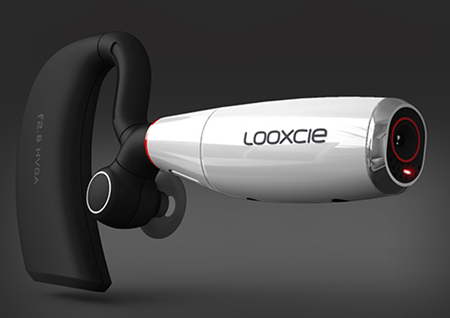
<p><a href="http://www.looxcie.com">Looxcie </a>has just launched their wearable camcorder and the associated mobile app that we designed! Looxcie is basically a camcorder that you wear on your ear which pairs with your smartphone so that you can use it as the viewfinder and to review, create, and share clips.  If you see something interesting, you can hit the “instant clip” button on the headset which will save the last 30 seconds of video and package it into a video file which can be shared via Bluetooth to the companion mobile app.</p>
<h2>Android app out today, iPhone, BlackBerry, Nokia coming soon&#8230;</h2>
<p><a href="http://www.looxcie.com"><img title="Looxcie Viewfinder" src="http://www.slicedbreaddesign.com/blog/wp-content/uploads/2010/09/viewfinder.png" alt="" width="372" height="598" /></a></p>
<p>The Android version of the mobile app is out today. Our designs for iPhone, all the various Blackberries, and Nokia are launching shortly.  You can buy Looxcie on Amazon for $199.</p>
<p>What I LOVE about Looxcie is the instant clip feature I alluded to earlier. Nobody wants to spend hours looking through their video to identify when something interested happened. Instead, you can create 30 second clips from interesting moments when they happen with one touch and then if you want to, go back later to edit together longer segments, extend 30 second clips, etc&#8230; It&#8217;s the perfect tool for me as a mom and me as a user researcher trying to capture what a subject is saying but without a good way (before Looxcie) to mark the &#8220;good parts&#8221; in the midst of videoing. I think this is the killer app for video.</p>
<p>Looxcie is getting some great press in the few hours since the launch. Check out <a href="http://www.fastcompany.com/1689172/looxcie-bluetooth-headset-camcorder-is-tivo-for-life">this article on Fast Company </a>calling it the Tivo for Life or learn more about the product at <a href="http://www.looxcie.com">www.looxcie.com</a>.</p>
<p><a class="a2a_dd a2a_target addtoany_share_save" href="http://www.addtoany.com/share_save#url=http%3A%2F%2Fwww.slicedbreaddesign.com%2Fblog%2Findex.php%2F2010%2F09%2Flooxcie-launches%2F&amp;title=Looxcie%20Launches%21" id="wpa2a_6"><img src="http://www.slicedbreaddesign.com/blog/wp-content/plugins/add-to-any/share_save_171_16.png" width="171" height="16" alt="Share"/></a></p>]]></content:encoded>
			<wfw:commentRss>http://www.slicedbreaddesign.com/blog/index.php/2010/09/looxcie-launches/feed/</wfw:commentRss>
		<slash:comments>0</slash:comments>
		</item>
		<item>
		<title>WeatherBill Site Launched</title>
		<link>http://www.slicedbreaddesign.com/blog/index.php/2010/09/weatherbill-site-launched/</link>
		<comments>http://www.slicedbreaddesign.com/blog/index.php/2010/09/weatherbill-site-launched/#comments</comments>
		<pubDate>Wed, 15 Sep 2010 17:51:47 +0000</pubDate>
		<dc:creator>Julie Stanford</dc:creator>
				<category><![CDATA[Information Architecture]]></category>
		<category><![CDATA[Interaction Design]]></category>
		<category><![CDATA[Visual Design]]></category>

		<guid isPermaLink="false">http://www.slicedbreaddesign.com/blog/?p=990</guid>
		<description><![CDATA[WeatherBill has just launched our new site design targeted at farmers and insurance agents. Following several rounds of rapid iterative design and Fast Insight user testing, we developed a user experience that educated customers about the unique process for purchasing WeatherBill&#8217;s insurance, provided insight into their current risk, and offered a simple yet powerful information [...]]]></description>
			<content:encoded><![CDATA[<p><a href="http://www.weatherbill.com"><img class="alignnone size-full wp-image-996" title="WeatherBill Home" src="http://www.slicedbreaddesign.com/blog/wp-content/uploads/2010/09/home.png" alt="" width="470" height="314" /></a></p>
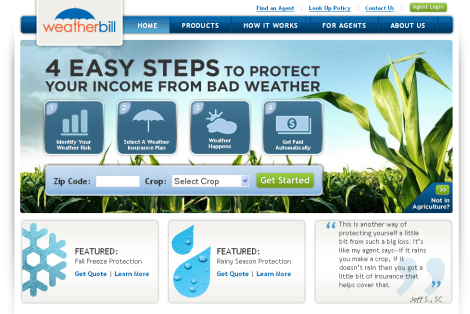
<p><a href="http://www.weatherbill.com">WeatherBill </a>has just launched our new site design targeted at farmers and insurance agents. Following several rounds of rapid iterative design and <a title="Fast Insight Testing" href="http://www.slicedbreaddesign.com/blog/index.php/2009/06/fast-insight-testing/" target="_self">Fast Insight </a>user testing, we developed a user experience that educated customers about the unique process for purchasing WeatherBill&#8217;s insurance, provided insight into their current risk, and offered a simple yet powerful information architecture.  Here&#8217;s what Greg Smirin, WeatherBill&#8217;s Vice President of Marketing and Product, had to say about our work:</p>
<p style="padding-left: 30px;"> &#8220;SlicedBread was a dream to work with. They&#8217;re smart, creative and took the time to understand what our users really wanted &#8211; and needed. The whole WeatherBill team can&#8217;t wait to work with them on the next project.&#8221;</p>
<h2>A few of our favorite features</h2>
<h3>Doormat drop down menu for WeatherBill products:</h3>
<p><a href="http://www.slicedbreaddesign.com/blog/wp-content/uploads/2010/09/doormat.png"><img class="alignnone size-full wp-image-993" title="Doormat dropdown" src="http://www.slicedbreaddesign.com/blog/wp-content/uploads/2010/09/doormat.png" alt="" width="444" height="364" /></a></p>
<h3>Clear infographics that communicate a farmer&#8217;s current risk:</h3>
<p><a href="http://www.slicedbreaddesign.com/blog/wp-content/uploads/2010/09/graph.png"><img class="alignnone size-full wp-image-994" title="graph" src="http://www.slicedbreaddesign.com/blog/wp-content/uploads/2010/09/graph.png" alt="" width="470" height="367" /></a></p>
<p>Beautiful visual design:</p>
<p><a href="http://www.slicedbreaddesign.com/blog/wp-content/uploads/2010/09/inside_page.png"><img class="alignnone size-full wp-image-995" title="inside_page" src="http://www.slicedbreaddesign.com/blog/wp-content/uploads/2010/09/inside_page.png" alt="" width="470" height="348" /></a></p>
<p>To check out the site for yourself, visit <a href="http://www.weatherbill.com">www.weatherbill.com</a>.</p>
<p><a class="a2a_dd a2a_target addtoany_share_save" href="http://www.addtoany.com/share_save#url=http%3A%2F%2Fwww.slicedbreaddesign.com%2Fblog%2Findex.php%2F2010%2F09%2Fweatherbill-site-launched%2F&amp;title=WeatherBill%20Site%20Launched" id="wpa2a_8"><img src="http://www.slicedbreaddesign.com/blog/wp-content/plugins/add-to-any/share_save_171_16.png" width="171" height="16" alt="Share"/></a></p>]]></content:encoded>
			<wfw:commentRss>http://www.slicedbreaddesign.com/blog/index.php/2010/09/weatherbill-site-launched/feed/</wfw:commentRss>
		<slash:comments>0</slash:comments>
		</item>
		<item>
		<title>Intuit Trends Redesign Launched</title>
		<link>http://www.slicedbreaddesign.com/blog/index.php/2010/02/intuit-trends-redesign-launched/</link>
		<comments>http://www.slicedbreaddesign.com/blog/index.php/2010/02/intuit-trends-redesign-launched/#comments</comments>
		<pubDate>Fri, 26 Feb 2010 01:01:32 +0000</pubDate>
		<dc:creator>Mia Silverman</dc:creator>
				<category><![CDATA[Interaction Design]]></category>
		<category><![CDATA[Visual Design]]></category>

		<guid isPermaLink="false">http://www.slicedbreaddesign.com/blog/?p=954</guid>
		<description><![CDATA[We’re excited to share that our redesign of the Intuit Trends application has just launched! Intuit Trends is a free online application that lets small businesses compare how they are doing financially (such as income, expenses, profits, etc.) with other businesses that are similar to them. We talked with small business owners to find out [...]]]></description>
			<content:encoded><![CDATA[<p>We’re excited to share that our redesign of the Intuit Trends application has just launched!</p>
<p><img class="alignnone size-full wp-image-956" title="home" src="http://www.slicedbreaddesign.com/blog/wp-content/uploads/2010/02/home.jpg" alt="home" width="470" height="324" /></p>
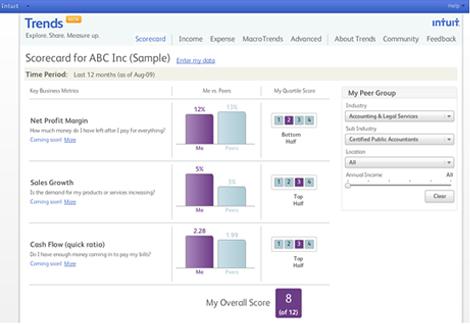
<p>Intuit Trends is a free online application that lets small businesses compare how they are doing financially (such as income, expenses, profits, etc.) with other businesses that are similar to them.</p>
<p>We talked with small business owners to find out what they most wanted to understand about how their businesses compared to their peers/competitors, and then introduced some big improvements to the previous design. This release delivers the first preliminary round of changes, and there are many more to come.</p>
<p>Key features of our redesign effort included in this preliminary release are:</p>
<ul>
<li>Introduced a new, personalized Scorecard
<ul>
<li>Before the redesign, the Trends application only offered small businesses the ability to view general trends about how their peers and competitors were doing. Now, small business owners can also see how their <em>own</em> company compares to their peers along three key business metrics and receive individual and overall scores.</li>
</ul>
</li>
</ul>

<p style="padding-left: 90px;"><img class="alignnone size-full wp-image-957" title="scorecard_small" src="http://www.slicedbreaddesign.com/blog/wp-content/uploads/2010/02/scorecard_small.jpg" alt="scorecard_small" width="336" height="297" /></p>
<ul>
<li>Provided a simple bar chart and scoring solution
<ul>
<li>Now that the site was going to show comparisons between a specific business and its peers, we needed a compelling way to present this information. To get started, we explored a variety of different design options for how best to show comparison data. Next, we usability tested our ideas and moved forward with the design that users liked best. Our final solution combined a simple bar chart with a visual quartile score, in a format that was easy for scanning.</li>
</ul>
</li>
</ul>
<p style="padding-left: 90px;"><img class="alignnone size-full wp-image-958" title="score" src="http://www.slicedbreaddesign.com/blog/wp-content/uploads/2010/02/score.jpg" alt="score" width="316" height="139" /></p>
<ul>
<li>Created a clean, fresh, and consistent visual design
<ul>
<li>We all know that it is important for information on a site to not only be useful, but to also be presented in a clear, visually appealing way. To help the Trends site appeal to its audience and convey the desired tone, we created a modern, clean look and feel for the site that also followed Intuit’s brand guidelines. We also introduced a consistent color scheme to use for “Me” and “Peers” across the site to help users differentiate between the two types of data.</li>
</ul>
</li>
</ul>
<p style="padding-left: 60px;"> <img class="alignnone size-full wp-image-959" title="visuals" src="http://www.slicedbreaddesign.com/blog/wp-content/uploads/2010/02/visuals.jpg" alt="visuals" width="407" height="139" /></p>
<p>You can check out our redesign for yourself at: <a href="https://workplace.intuit.com/db/bejqb2kpn">https://workplace.intuit.com/db/bejqb2kpn</a>.<br />
We’d love to hear what you think!</p>
<p><a class="a2a_dd a2a_target addtoany_share_save" href="http://www.addtoany.com/share_save#url=http%3A%2F%2Fwww.slicedbreaddesign.com%2Fblog%2Findex.php%2F2010%2F02%2Fintuit-trends-redesign-launched%2F&amp;title=Intuit%20Trends%20Redesign%20Launched" id="wpa2a_10"><img src="http://www.slicedbreaddesign.com/blog/wp-content/plugins/add-to-any/share_save_171_16.png" width="171" height="16" alt="Share"/></a></p>]]></content:encoded>
			<wfw:commentRss>http://www.slicedbreaddesign.com/blog/index.php/2010/02/intuit-trends-redesign-launched/feed/</wfw:commentRss>
		<slash:comments>1</slash:comments>
		</item>
		<item>
		<title>Ten Ways to Improve Your Demand Response Program</title>
		<link>http://www.slicedbreaddesign.com/blog/index.php/2010/02/ten-ways-to-improve-your-demand-response-program/</link>
		<comments>http://www.slicedbreaddesign.com/blog/index.php/2010/02/ten-ways-to-improve-your-demand-response-program/#comments</comments>
		<pubDate>Mon, 22 Feb 2010 22:28:54 +0000</pubDate>
		<dc:creator>Julie Stanford</dc:creator>
				<category><![CDATA[Interaction Design]]></category>
		<category><![CDATA[Review]]></category>
		<category><![CDATA[Smart Grid]]></category>

		<guid isPermaLink="false">http://www.slicedbreaddesign.com/blog/?p=931</guid>
		<description><![CDATA[While consumer smart grid energy portals are an important area for user centered design, there is an often overlooked design challenge in helping utilities craft a demand response (DR) program that really works. For readers unfamiliar with the term, demand response is a program utilities are exploring which asks customers to reduce electricity use during [...]]]></description>
			<content:encoded><![CDATA[<p><img class="alignnone size-full wp-image-933" title="demand response image" src="http://www.slicedbreaddesign.com/blog/wp-content/uploads/2010/02/demand-response-image.jpg" alt="demand response image" width="400" height="302" /></p>
<p>While consumer smart grid energy portals are an important area for user centered design, there is an often overlooked design challenge in helping utilities craft a demand response (DR) program that really works. For readers unfamiliar with the term, demand response is a program utilities are exploring which asks customers to reduce electricity use during peak times in exchange for financial incentives. Utilities have recently launched DR programs with the basic assumption that providing access to energy usage data and an economic incentive would motivate users to change their behavior. Turns out, encouraging behavior change is not so easy. With that challenge in mind, I decided to look at what’s been done in the past to motivate energy behavior change and see how learnings from past efforts can be applied to the design of demand response systems – from a consumer perspective.</p>
<p>Based on my literature review, the following are ten ideas to consider when crafting your demand response program to create an effective user experience:</p>
<p><strong>1. Carefully craft and explain rate structures<br />
</strong>Construct the rates and program carefully with consideration of more than the just the economics. A 2008 study of a time of use pricing pilot found that suggestions for behavior change were highly time sensitive to key family patterns such as mealtimes and did not work if they were disruptive to the household. To make sure you create a structure that is within the capabilities of your target audience, consider conducting a user study to understand how household behaviors align with specific time periods. Then you can craft a program with realistic expectations for consumption management and provide users with actionable advice that they can follow without changing their family patterns.</p>

<p><strong>2. Create a goal – get commitment – provide feedback</strong><br />
Consider structuring the DR program so that participants get a specific difficult goal for participation, commit to the goal, and then get feedback on their goal. This type of structure has proven repeatedly to be one of the strongest approaches for motivating energy behavior change. In one study, researchers gave households a difficult goal (20% energy reduction), easy goal (2% reduction), or no goal for energy use. All groups (including the no goal control) were then given information on which appliances used the most energy. The goal was also combined with feedback or not. Households who received a difficult goal + feedback conserved the most (15.1%) and were the only group to significantly differ from the control. Participants with the easy goal did not differ in behavior from the control at all. To make an even stronger program, consider an extra reward if the goal is reached.</p>
<p><strong>3. Provide frequent feedback</strong><br />
The more continuous the feedback, the more effective the intervention. In a seminal study conducted over 30 years ago in 1979, households were given continuous feedback over a period of 11 months about monetary costs of electricity use by means of a monitor displaying electricity use cents per hour. On average, households that had a monitor installed reduced electricity by 12%. Although hourly, daily, weekly, and monthly feedback all create savings effects, the more frequent the feedback, the more effective it is. Consider creative ways to deliver that feedback via web portals, in home devices, smart phones or on SMS (intermittently).</p>
<p><strong>4. Emphasize choice and control</strong><br />
One study considered people’s resistance to installing automatic day/night thermostats. Once the thermostat was redesigned to allow residents to override the system temporarily, the thermostat was much more attractive to residents – even though in actual use most people<em> never overrode them</em>. Similarly, a DR program should emphasize choice and control – people can opt into the program and still have full control over their consumption.</p>
<p><strong>5. Tap into the power of the group</strong><br />
One energy conservation program that had a lot of success enrolled people in groups where they discussed and compared conservation behavior with their social group over a long term basis. Similarly, virtual networks of known groups can be set up to motivate participation in DR programs – for example by tapping into existing social networks of friends on Facebook to encourage participation.<br />
In addition, consider a structure that offers additional savings if everyone in a group or neighborhood participates and reaches a set goal (see point 1 above). One study indicated that an incentive that offered on an individual <strong>and</strong> group level – in this case for all residents of one apartment building &#8212; was more effective than solely an individual incentive.</p>
<p><strong>6. Frame program benefits as avoiding loss rather than emphasizing gain</strong><br />
The amount of joy that someone experiences when winning $100 is not equal to the consternation suffered when losing the same amount. Most people are more willing to take risks to avoid or minimize a loss than to increase their fortune. So, focus on showing residents how <strong>much money they are <em>losing </em>every month</strong> by not enrolling in demand response. Once the loss is obvious, people will take action.</p>
<p><strong>7. Integrate complex information</strong><br />
When calculating energy savings, people usually can’t take into account all the elements such as rising fuel costs, the real long terms benefit, etc… So, do the math for them! Give price information that shows the full savings, presented as avoidance of a negative consequence of non-action (see point above). Use the actual data you already know about the consumer’s energy usage to make the information actionable and real.</p>
<p><strong>8. Present information using vivid personal stories and videos</strong><br />
Statistical data summaries and impersonal information are less effective than case studies and colorful stories for motivating participation. For example, imagine that you are considering a new car and are choosing between a Volvo and a Saab. Consumer Reports informs you that the consensus of its studies is that the Volvo has a better repair record. That evening, you go to a party and run into an acquaintance who tells you a horrific story about a Volvo. Although the Consumer Reports article is based on hundred of repair records and your friend’s story is just one additional data point, most people will be swayed by their friend not to buy that car.<br />
When communicating the benefits of a direct response program, demonstrate benefits with concrete stories about real people who save more energy than average but are “just like you. To be even more effective, present the content in videos. Numerous studies have also shown that videos of people modeling the desired actions are more effective in getting people to change their behavior than written information or lectures.</p>
<p><strong>9. Use a foot in the door strategy</strong><br />
Individuals who agree to a small initial task are much more likely to agree to a larger request. So, instead of asking people to enroll in the full DR program immediately, first ask people to participate in a small act, such as filling out a survey, and then later ask them to consider signing up for demand response as a follow up to the first request. For example, one representative study showed that the percentage of people agreeing to an unattractive sign being put on their front lawn encouraging people to drive carefully increased dramatically (from 17% to 55%) if they had first been given the opportunity to sign a petition favoring safe driving.</p>
<p><strong>10. Communicate trust</strong><br />
One key differentiator for successful energy programs is successful marketing to get people to even consider trying it out. We’ve found in our research that people inherently don’t trust their utility so partner with a local organization people do trust to market your program. In a marketing experiment conducted in Minnesota, a county government contracted with a private company to install energy saving equipment in homes in exchange for payment of a percentage of the value of the energy saved. To market the program, households received one of three types of letters: one letter was sent on company letterhead with no mention of cooperation with the county, one letter went out on company letterhead and mentioned the county’s role, and the third went out on county letterhead and was signed by the County Board of Commissioners. The source of information had a profound effect on consumer response – request for energy audits came from 6%, 11% and 26% respectively of households receiving the three types of letters.</p>
<h2>Next Steps</h2>
<p>We’re continuing to do more research in this area and will publish more insight expanding into some areas mentioned above. In the meantime, here’s a partial list of references…happy reading!</p>
<ul>
<li>Abrahamsen, W., Steg, L., Vlek, C., &amp; Rothengatter, T. (2005). A review of intervention studies aimed at household energy conservation. <em>Journal of Environmental Psychology</em>, 25, 273-291.</li>
<li>Krantz, D. H., &amp; Kunreuther, H. C. (2007). Goals and plans in decision making. <em>Judgment and Decision Making,</em> 2(3), 137-168.</li>
<li>Geller, E. S., (1992) It takes more than information to save energy. <em>American Psychologist</em>, 814-815.</li>
<li>Geller, E. S., Winett, R. A., &amp; Everett, P. B. (1982).<em> Preserving the environment: New strategies for behavior change</em>. Elmsford, NY: Pergamon Press.</li>
<li>Lutzenhiser, S. et al (2009)<em> Beyond the Price Effect in Time-of-Use Programs: Results from a Municipal Utility Pilot</em>, 2007-2008. Presented at the International Energy Program Evaluation Conference, Portland, OR, August 12-14, 2009. <a href="http://drrc.lbl.gov/pubs/lbnl-2750e.pdf">http://drrc.lbl.gov/pubs/lbnl-2750e.pdf</a></li>
<li>McKenzie-Mohr, D. and Smith, W. (1999) <em>Fostering Sustainable Behavior</em>. Gabriola Island, B.C., Canada: New Society Publishers.</li>
<li>Swim, Janet et al. (2009) <em>Psychology and global climate change: addressing a multi-faceted  phenomenon and set of challenges, A report by the American Psychological Association Task Force on the Interface between psychology and global climate change. </em><a href="http://www.apa.org/science/about/publications/climate-change.aspx">http://www.apa.org/science/about/publications/climate-change.aspx</a></li>
<li>Winett, R. A., Hatcher, J. W., Fort, T. R., Leckliter, I. N., Love, S. Q., Riley, A. W., et al. (1982). The effects of videotape modeling and daily feedback on residential electricity conservation, home temperature and humidity, perceived comfort, and clothing worn: Winter and summer. <em>Journal of Applied Behavior Analysis</em>, 15(3), 381-402.</li>
<li>Winett, R.A. and Geller, E.S., (1981) Comment on “Psychological research and energy policy”. <em>American Psychologist</em>, (425-426).</li>
<li>Yates, S. and Aronson, E., (1983) A social psychological perspective on energy conservation in residential buildings. <em>American Psychologist</em>, (435-444).</li>
<li>Stern, P. C., Aronson, E., Darley, J. M., Hill, D. H., Hirst, E., &amp; Kempton, W. et al. (1986). The effectiveness of incentives for residential energy conservation. <em>Evaluation Review</em>, 10(2),<br />
147-176.</li>
</ul>
<p><strong>For related posts about designing for the smart grid, check out:</strong></p>
<ul>
<li><a href="http://www.slicedbreaddesign.com/blog/index.php/2009/12/tips-for-improving-greenboxs-consumer-energy-portal/">Tips For Improving Greenbox&#8217;s Energy Portal</a></li>
<li><a href="http://www.slicedbreaddesign.com/blog/index.php/2009/11/watts-all-the-buzz-about-smart-grid-energy/">Watts All the Buzz  About Smart Grid Energy?</a></li>
</ul>
<p><a class="a2a_dd a2a_target addtoany_share_save" href="http://www.addtoany.com/share_save#url=http%3A%2F%2Fwww.slicedbreaddesign.com%2Fblog%2Findex.php%2F2010%2F02%2Ften-ways-to-improve-your-demand-response-program%2F&amp;title=Ten%20Ways%20to%20Improve%20Your%20Demand%20Response%20Program" id="wpa2a_12"><img src="http://www.slicedbreaddesign.com/blog/wp-content/plugins/add-to-any/share_save_171_16.png" width="171" height="16" alt="Share"/></a></p>]]></content:encoded>
			<wfw:commentRss>http://www.slicedbreaddesign.com/blog/index.php/2010/02/ten-ways-to-improve-your-demand-response-program/feed/</wfw:commentRss>
		<slash:comments>1</slash:comments>
		</item>
		<item>
		<title>AT&amp;T: You&#8217;re on notice</title>
		<link>http://www.slicedbreaddesign.com/blog/index.php/2009/12/att-youre-on-notice/</link>
		<comments>http://www.slicedbreaddesign.com/blog/index.php/2009/12/att-youre-on-notice/#comments</comments>
		<pubDate>Thu, 10 Dec 2009 20:00:15 +0000</pubDate>
		<dc:creator>Julie Stanford</dc:creator>
				<category><![CDATA[Technology/Software]]></category>

		<guid isPermaLink="false">http://www.slicedbreaddesign.com/blog/?p=921</guid>
		<description><![CDATA[AT&#38;T just announced in an investor’s conference that smart phone users are using too much of its network for data and that something is going to have to be done to curb their usage since their network isn’t able to handle it. All I can say is WAH-WAH-WAH. Let me get this straight. AT&#38;T has [...]]]></description>
			<content:encoded><![CDATA[<p>AT&amp;T <a href="http://www.informationweek.com/news/mobility/business/showArticle.jhtml?articleID=222001355&amp;subSection=News">just announced</a> in an investor’s conference that smart phone users are using too much of its network for data and that something is going to have to be done to curb their usage since their network isn’t able to handle it. All I can say is WAH-WAH-WAH.</p>
<p>Let me get this straight. AT&amp;T has an issue that their network is slow, which clearly is not the fault of the network but is the fault of the users of the network. So, instead of upgrading their network or preparing for the introduction of more smart phones which are going to cripple their network further, they are going to do something punitive to get smart phone users to download less data. And is their plan to do this while still continuing to charge $40/month for data service? They could offer tiered pricing to people so that some can opt into a lower price plan for more limited data, but charging users who are already paying $40 for apparently subpar unlimited service doesn’t seem fair.</p>
<p>As you can tell, as a user advocate, I think this is absurd. Problems with your product are never the fault of the customer. They are your fault.  And, most importantly, if you are AT&amp;T and ACTIVELY PROMOTING all the awesome apps and great things you can do with the iPhone while then complaining that people are using them too much, you don’t have a leg to stand on.</p>
<p>This behavior is not acceptable for an organization with a lot of competitors (rumored to be losing its iPhone exclusivity soon) that sells a service. Your goal as a product manager, engineer, designer, CEO, etc… is to make your users happy and not think of ways to save money by pissing them off.  It may save money in the short term, but if your business is selling a service, there should be a high level of service involved.</p>
<p>This is a new announcement from AT&amp;T but I predict it is going to lose them customers in the long run. In the words of Stephen Colbert, AT&amp;T you’re on notice.</p>
<p><a class="a2a_dd a2a_target addtoany_share_save" href="http://www.addtoany.com/share_save#url=http%3A%2F%2Fwww.slicedbreaddesign.com%2Fblog%2Findex.php%2F2009%2F12%2Fatt-youre-on-notice%2F&amp;title=AT%26T%3A%20You%E2%80%99re%20on%20notice" id="wpa2a_14"><img src="http://www.slicedbreaddesign.com/blog/wp-content/plugins/add-to-any/share_save_171_16.png" width="171" height="16" alt="Share"/></a></p>]]></content:encoded>
			<wfw:commentRss>http://www.slicedbreaddesign.com/blog/index.php/2009/12/att-youre-on-notice/feed/</wfw:commentRss>
		<slash:comments>2</slash:comments>
		</item>
		<item>
		<title>Tips for Improving Greenbox&#8217;s Energy Portal</title>
		<link>http://www.slicedbreaddesign.com/blog/index.php/2009/12/tips-for-improving-greenboxs-consumer-energy-portal/</link>
		<comments>http://www.slicedbreaddesign.com/blog/index.php/2009/12/tips-for-improving-greenboxs-consumer-energy-portal/#comments</comments>
		<pubDate>Thu, 10 Dec 2009 00:47:29 +0000</pubDate>
		<dc:creator>Mia Silverman</dc:creator>
				<category><![CDATA[Interaction Design]]></category>
		<category><![CDATA[Review]]></category>
		<category><![CDATA[Smart Grid]]></category>

		<guid isPermaLink="false">http://www.slicedbreaddesign.com/blog/?p=882</guid>
		<description><![CDATA[A recent SmartGridNews.com article praised Greenbox Technology for “deliver[ing] understanding to utility customers.” While Greenbox does provide useful functionality that differentiates it from its competitors, key improvements to its interaction design would go a long way to provide a better overall user experience. The Good To be fair, Greenbox does deserve a gold star for [...]]]></description>
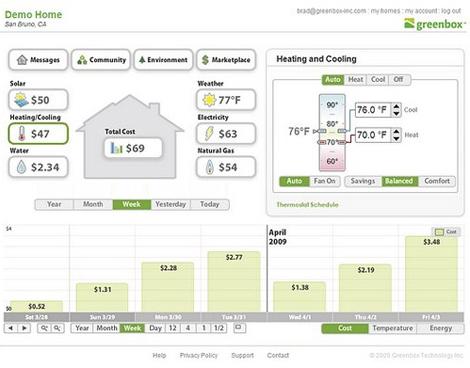
			<content:encoded><![CDATA[<p>A recent <a href="http://www.smartgridnews.com/artman/publish/reviews/Greenbox_Delivers_Energy_Usage_Understanding_to_Utility_Customers-600.html">SmartGridNews.com article</a> praised Greenbox Technology for “deliver[ing] understanding to utility customers.” While Greenbox does provide useful functionality that differentiates it from its competitors, key improvements to its interaction design would go a long way to provide a better overall user experience.</p>
<p><img class="alignnone size-full wp-image-883" title="1_greenbox_original" src="http://www.slicedbreaddesign.com/blog/wp-content/uploads/2009/12/1_greenbox_original.jpg" alt="1_greenbox_original" width="470" height="368" /></p>
<h2>The Good</h2>
<p>To be fair, Greenbox <em>does</em> deserve a gold star for displaying energy data specifically in <em>dollars </em>($).  As I mentioned in an <a href="http://www.slicedbreaddesign.com/blog/index.php/2009/11/watts-all-the-buzz-about-smart-grid-energy/">earlier post</a>, consumers don’t understand energy units, such as kWh, and are motivated to change their behavior by saving money.</p>
<p><img class="alignnone size-full wp-image-884" title="costs_dollars" src="http://www.slicedbreaddesign.com/blog/wp-content/uploads/2009/12/costs_dollars.jpg" alt="costs_dollars" width="281" height="101" /></p>
<h2>The Not So Good</h2>
<p><span style="font-weight: normal; font-size: 13px;">But, what about the rest of the Greenbox design?   Greenbox gets caught up in the same usability pitfalls I’ve seen in other consumer energy portals as well &#8211;too much information and not enough direct reference to the things that matter most to users.  Here are my top three suggestions to help Greenbox, or any consumer energy portal, deliver an excellent user experience:</span></p>

<p><strong>1) Simplify, simplify, simplify!</strong></p>
<p><span style="font-weight: normal;">My foremost suggestion is simplicity. At first glance, the Greenbox interface looks very busy. There are many controls and buttons, and it tries to accomplish too much on a single page. Do users really need to be able to adjust their thermostat controls right on the main landing page, <em>and</em> also view their overview and data details at the same time? Instead, the home page could show only the <em>most</em> important information at first glance, and use color to further highlight and differentiate content on the page. The user can always drill-in to inside pages to access the less urgent information or access info on mouseover.</span></p>
<p><strong>2) Engage users immediately with compelling content and proactive recommendations</strong></p>
<p><span style="font-weight: normal;">My first response to the Greenbox dashboard is, “So what?”  I’m missing context to <em>understand</em> the significance of my data. For example, is my overall usage good or bad? Am I using more or less energy than I did last month? Am I on track so far this month? Also, the portal doesn’t offer any suggestions for changing my behavior so it’s unclear what my next step should be. </span></p>
<p>To engage its users, Greenbox should focus on delivering insightful content that immediately provides context and motivation. Delight users by anticipating their questions and displaying answers at-a-glance. Provide simple charts and visuals on the dashboard to compare energy usage to different time periods and to others in the community so that people understand why this information matters.</p>
<p><strong>3) Adhere to basic design principles</strong></p>
<p><span style="font-weight: normal;">In addition to overall experience enhancements, here are some basic user interface guidelines to help GreenBox or any other site be more usable:</span></p>
<ul>
<li><strong>Use clear titles</strong> Is the bar chart below showing data for <em>all </em>energy resource usage<em>, just</em> the electricity usage, or <em>only</em> heating and cooling (because that’s what is selected in green)? It’s hard to know for sure without a clear title for the chart.</li>
</ul>
<p style="padding-left: 30px;"><img class="alignnone size-full wp-image-885" title="title" src="http://www.slicedbreaddesign.com/blog/wp-content/uploads/2009/12/title.jpg" alt="title" width="276" height="264" /></p>
<ul>
<li><strong>Use visual cues to help users appropriately group related items</strong><span style="font-weight: normal;">The content relationships on GreenBox are a little hard to parse.  For example, in the screenshot below, the “Heating/Cooling” button selected on the left side of the dashboard, actually updates the content shown on the right side, which is not immediately obvious.</span></li>
</ul>
<p><img class="alignnone size-full wp-image-887" title="similarity_before" src="http://www.slicedbreaddesign.com/blog/wp-content/uploads/2009/12/similarity_before.jpg" alt="similarity_before" width="470" height="179" /></p>
<p style="padding-left: 30px;">Instead, GreenBox could make these two items more visually related to connect them. For example, put the same  green border around the box on the right and give both elements the same background color (see update below). Then, I would be much more likely to quickly understand their relationship.</p>
<address><strong>Updated design with green box</strong>:<img class="alignnone size-full wp-image-886" title="similarity_after" src="http://www.slicedbreaddesign.com/blog/wp-content/uploads/2009/12/similarity_after.jpg" alt="similarity_after" width="470" height="179" /></address>
<ul>
<li><strong>Visually identify hyperlinks &amp; interactive features</strong><span style="font-weight: normal;">To help users understand what’s clickable, it’s important to differentiate hyperlinks and interactive features from other static elements on the page. For example, on the GreenBox site buttons and links currently use the same dark text color as other static elements, which makes them difficult to identify.</span></li>
</ul>
<p style="padding-left: 30px;"><img class="alignnone size-full wp-image-888" title="buttons_and_links" src="http://www.slicedbreaddesign.com/blog/wp-content/uploads/2009/12/buttons_and_links.jpg" alt="buttons_and_links" width="395" height="163" /></p>
<h2>A Minimal Redesign Idea</h2>
<p>If we take the recommendations above and do a very <em>minimal</em> redesign of Greenbox limiting ourselves to only minor changes to content and layout, we already begin to see large improvements in terms of usability.</p>
<p><img class="alignnone size-full wp-image-889" title="updated_design" src="http://www.slicedbreaddesign.com/blog/wp-content/uploads/2009/12/updated_design.jpg" alt="updated_design" width="470" height="415" /></p>
<p>For example, in this minimal redesign, the relationships between content is clearer due to stronger visual cues and use of titles, the interactive elements more readily “pop” from the page, and inclusion of arrow icons begin to tell an interesting story about the user’s energy consumption.</p>
<h2>But we’re not done yet…</h2>
<p><span style="font-weight: normal;">Of course, it would take GreenBox more than just a simple redesign with no change in functionality to address all of our recommendations.  As a next step, I think Greenbox would benefit to take a more critical look at its overall structure and content to ensure they lend themselves to a good user experience – in particular thinking about the best items to put on the home page and trying to answer the question “So what?”</span></p>
<p>Will we see a new and improved Greenbox site in the near future?  We hope so.  In the meantime, let’s learn both from the things that Greenbox does well <em>and</em> from the areas that Greenbox falls short so that we can continue to focus <em>our</em> energy on creating intuitive, meaningful, and persuasive user experiences.</p>
<p>&nbsp;</p>
<p><strong>Related post: </strong><a href="http://www.slicedbreaddesign.com/blog/index.php/2009/11/watts-all-the-buzz-about-smart-grid-energy/ ">Watts all the buzz about smart grid energy?</a></p>
<p><a class="a2a_dd a2a_target addtoany_share_save" href="http://www.addtoany.com/share_save#url=http%3A%2F%2Fwww.slicedbreaddesign.com%2Fblog%2Findex.php%2F2009%2F12%2Ftips-for-improving-greenboxs-consumer-energy-portal%2F&amp;title=Tips%20for%20Improving%20Greenbox%E2%80%99s%20Energy%20Portal" id="wpa2a_16"><img src="http://www.slicedbreaddesign.com/blog/wp-content/plugins/add-to-any/share_save_171_16.png" width="171" height="16" alt="Share"/></a></p>]]></content:encoded>
			<wfw:commentRss>http://www.slicedbreaddesign.com/blog/index.php/2009/12/tips-for-improving-greenboxs-consumer-energy-portal/feed/</wfw:commentRss>
		<slash:comments>0</slash:comments>
		</item>
		<item>
		<title>Which Metrics Equal Happy Users?</title>
		<link>http://www.slicedbreaddesign.com/blog/index.php/2009/12/which-metrics-equal-happy-users/</link>
		<comments>http://www.slicedbreaddesign.com/blog/index.php/2009/12/which-metrics-equal-happy-users/#comments</comments>
		<pubDate>Thu, 03 Dec 2009 20:28:57 +0000</pubDate>
		<dc:creator>Laura Klein</dc:creator>
				<category><![CDATA[Interaction Design]]></category>
		<category><![CDATA[User Research]]></category>

		<guid isPermaLink="false">http://www.slicedbreaddesign.com/blog/?p=861</guid>
		<description><![CDATA[One of the greatest tools available to me as an interaction designer is the ability to see real metrics. I’m guessing that’s surprising to some people. After all, many people still think that design all happens before a product ever gets into the hands of users, so how could I possibly benefit from finding out [...]]]></description>
			<content:encoded><![CDATA[<p>One of the greatest tools available to me as an interaction designer is the ability to see real metrics. I’m guessing that’s surprising to some people. After all, many people still think that design all happens before a product ever gets into the hands of users, so how could I possibly benefit from finding out what users are actually doing with my products?</p>
<p>Well, for one thing, I believe that design should continue for as long as a product is being used by or sold to customers. It’s an iterative process, and there’s nothing that gives me quicker, more accurate insight into how a new product version or feature is performing than looking at user metrics.</p>
<p>But there’s something that I, as a user advocate, care about quite a lot that is really very hard to measure accurately. I care about User Happiness. Now, I don’t necessarily care about it for some vague, good karma reason. I care because I think that happy users are retained users and, often, paying users. I believe that happy users tell their friends about my product and reduce my acquisition costs. I truly believe that happy users can earn money for my product.</p>
<p>So, how can I tell whether my users are happy? You know, without talking to every single one of them?</p>
<p>Although I think that happy users can equal more registrations, more revenue, and more retention, I don’t actually believe that this implies the opposite. In other words, there are all sorts of things I can do to retain customers or get more money out of them that don’t actually make them happy. Here are a few of the important business metrics you might be tempted to use as shorthand for customer happiness – but it’s not always the case:</p>
<h2>Retention</h2>
<p>An increase in retention numbers seems like a good indication that your customers are happy. After all, happier customers stay longer, right?</p>

<p>But, do you mean retention or <strong>forced retention? </strong> For example, I can artificially increase my retention numbers by locking new users into a long contract, and that’s going to keep them with me for awhile. Once that contract’s up, they are free to move wherever they like, and then I need to acquire a customer to replace them. And, if my contract is longer than my competitors’, it can scare off new users.</p>
<p>Also, the retention metric is easy to affect with switching barriers, which may increase the number of months I have a customer while making them less happy. Of course, if those switching barriers are removed for any reason – for example, cell phone number portability – I can lose my hold over long time customers.</p>
<p><strong>While retention can be an indicator of happy customers, increasing retention by any means necessary doesn’t necessarily make your customers happier. </strong></p>
<h2>Revenue</h2>
<p>Revenue’s another metric that seems like it would point to happy customers. Increased revenue means people are spending more, which means they like your service!</p>
<p>There are all sorts of ways I can increase my revenue without making my customers happier. For example, I can rope them into paying for things they didn’t ask for or use deceptive strategies to get them to sign up for expensive subscriptions. This can work in the short term, but it’s likely to make some customers very unhappy, and maybe make them ex-customers in the long run. <strong></strong></p>
<p>Revenue is also tricky to judge for free or ad-supported products. Again, you can boost ad revenue on a site simply by piling more ads onto a page, but that doesn’t necessarily enhance your users’ experience or happiness.</p>
<p><strong>While increased revenue may indicate that people are spending more because they find your product more appealing, it can also be caused by sacrificing long term revenue for short term gains. </strong></p>
<h2>NPS – Net Promoter Score</h2>
<p>The net promoter score is a measure of how many of your users would recommend your product to a friend. It’s actually a pretty good measure of customer happiness, but the problem is that it can be tricky to gauge accurately. It generally needs to be obtained through surveys and customer contact rather than simple analytics, so it suffers from relying on self-reported data and small sample sizes. Also, it tends to be skewed in favor of the type of people who answer surveys and polls, which may or may not be representative of your customer base.</p>
<p><strong>While NPS may be the best indicator of customer happiness, it can be difficult to collect accurately. Unless your sample size is quite large, the variability from week to week can make it tough to see smaller changes that may warn of a coming trend.</strong></p>
<h2>Conversion to Paying</h2>
<p>For products using the freemium or browsing model, this can be a useful metric, since it lets you know that people like your free offering enough to pay for it. However, it can take awhile to collect the data after you make a change to your product because you have to wait for enough new users to convert to payers.</p>
<p>Also, it doesn’t work well on ad-supported products or products that require payment upfront.</p>
<p>Most importantly, it doesn’t let you know how happy your paying customers are, since they’ve already converted.</p>
<p><strong>Conversion to Paying can be useful, but it is limited to freemium or browsing models, and it tends to skew toward measuring the free part of the product rather than the paid product. </strong></p>
<h2>Engagement</h2>
<p>Engagement is an interesting metric to study, since it tells me how soon and often users are electing to come back to interact with my product and how long they’re spending. This can definitely be one of the indicators of customer happiness for ecommerce, social networking, or gaming products that want to maximize the amount of time spent by each user. However, increasing engagement for a utility product like processing payroll or managing personal information might actually be an indicator that users are being forced to do more work than they’d like.</p>
<p>Also, engagement is one of the easiest metrics to manipulate in the short run. One time efforts, like marketing campaigns, special offers, or prize giveaways can temporarily increase engagement, but unless they’re sustainable and cost effective, they’re not going to contribute to the long term happiness of your customers.</p>
<p>For example, one company I worked with tried inflating their engagement numbers by offering prizes for coming back repeatedly for the first few days. While this did get people to return after their first visit, it didn’t actually have any effect on long term user happiness or adoption rates.</p>
<p><strong>Engagement can be one factor in determining customer happiness, but this may not apply if you don’t have an entertainment or shopping product. Also, make sure your engagement numbers are being driven by actual customer enjoyment of your product and not by artificial tricks. </strong></p>
<h2>Registration</h2>
<p>While registration can be the fastest metric to see changes in, it’s basically worthless for figuring out how happy your users are, since they’re not interacting with the product until after they’ve registered. The obvious exception is products with delayed (i.e. lazy) registration, in which case it can act like a lower barrier-to-entry version of Conversion to Paying. When you allow users to use your product for awhile before committing, an increase in registration can mean that users are finding your product compelling enough to take the next step and register.</p>
<p><strong>Registration is only an indicator of happy customers when it’s lazy, and even then it’s only a piece of the puzzle, albeit an important one. </strong></p>
<h2>Customer Service Contacts</h2>
<p>You’d think that decreasing the number of calls and emails to your customer service team would give you a pretty good idea of how happy your customers are. Unfortunately, this one can be manipulated aggressively by nasty tactics like making it harder to get to a representative or find a phone number. A sudden decrease in the number of support calls might mean that people are having far fewer problems. Or, it might mean that people have given up trying to contact you and gone somewhere else.</p>
<p><strong>Decreased Customer Service Contacts may be caused by happier customers, but that’s not always the case. </strong></p>
<h2>So which is it?</h2>
<p>While all of these metrics can be extremely important to your business, no single one can tell you if you are making your customers happy. However, looking at trends in all of them can certainly help you determine whether a recent change to your product has made your customers happier.</p>
<p>For example, imagine that you introduce a new element to your social networking site that reminds users of their friends’ birthdays and then helps them choose and buy the perfect gifts. Before you release the feature, you decide that it is likely to positively affect:</p>
<ul>
<li><strong>Engagement</strong> – every time you send a reminder of a birthday, it gives the user a reason to come back to the product and reengage.</li>
<li><strong>Revenue</strong> – assuming you are taking a cut of the gift revenue, you should see an increase when people find and buy presents.</li>
<li><strong>Conversion to Paying</strong> – you’re giving your users a new reason to spend money.</li>
<li><strong>(Lazy) Registration</strong> – if you only allow registered users to take advantage of the new feature, this can give people a reason to register.</li>
<li><strong>Retention</strong> – you’re giving users a reason to stay with you and keep coming back year after year, since people keep having birthdays.</li>
</ul>
<p>Once the feature is released, you look at those numbers and see a statistically significant positive movement in all or most of those metrics. As long as the numbers aren’t being inflated by tricks or unsustainable methods (for example, you’re selling the gifts at a huge loss, or you’re giving people extra birthdays), you can assume that your customers are being made happy by your new feature and that the feature will have a positive impact on your business.</p>
<p>Of course, while you’re looking at all of your numbers and metrics and analysis, some good old fashioned customer outreach, where you actually get out and talk directly with users, can also do wonders for your understanding of WHY they’re feeling the way they’re feeling. <a href="../blog/index.php/2009/05/ab_qual_testing/">But that’s another post</a>.</p>
<p>Interested? <a href="http://twitter.com/lauraklein">You should follow me on Twitter.</a></p>
<p>For more information on the user experience, check out:</p>
<ul>
<li><a href="http://www.slicedbreaddesign.com/blog/index.php/2009/11/6-reasons-users-hate-your-new-feature/">6 Reasons Users Hate Your New Feature</a></li>
<li><a href="http://www.slicedbreaddesign.com/blog/index.php/2009/11/is-continuous-deployment-good-for-users/">Is Continuous Deployment Good For Users?</a></li>
<li><a href="http://www.slicedbreaddesign.com/blog/index.php/2009/10/a-faster-horse-when-not-to-listen-to-users/">A Faster Horse – When Not to Listen to Users</a></li>
<li><a href="http://www.slicedbreaddesign.com/blog/index.php/2009/09/improving-the-roi-on-your-user-research/">Improving the ROI for Your Customer Feedback</a></li>
<li><a href="http://www.slicedbreaddesign.com/blog/index.php/2009/08/5-things-wrong-when-talking-to-users/">5 Things People Get Wrong When Talking to Users</a></li>
</ul>
<p><a class="a2a_dd a2a_target addtoany_share_save" href="http://www.addtoany.com/share_save#url=http%3A%2F%2Fwww.slicedbreaddesign.com%2Fblog%2Findex.php%2F2009%2F12%2Fwhich-metrics-equal-happy-users%2F&amp;title=Which%20Metrics%20Equal%20Happy%20Users%3F" id="wpa2a_18"><img src="http://www.slicedbreaddesign.com/blog/wp-content/plugins/add-to-any/share_save_171_16.png" width="171" height="16" alt="Share"/></a></p>]]></content:encoded>
			<wfw:commentRss>http://www.slicedbreaddesign.com/blog/index.php/2009/12/which-metrics-equal-happy-users/feed/</wfw:commentRss>
		<slash:comments>6</slash:comments>
		</item>
	</channel>
</rss>